



Description
Download Color Seizer – Color Picker, HTML, RGB, C++ Code Tool
Overview
Color Seizer is a specialized mobile application designed for users who need to identify and extract precise color codes from any visual source on their screen. Its primary purpose is to enable quick and accurate color detection, providing users with exact color values in multiple coding formats. This makes it particularly valuable for developers, designers, and digital creators who require consistent color representation across different platforms and programming environments. The app solves the common challenge of manually estimating or guessing color codes, which can lead to inconsistencies in design and development workflows.
Target users include software developers, UI/UX designers, and anyone involved in digital content creation who frequently needs to reference or replicate specific colors from their screen. The app is especially beneficial for programmers working with languages such as HTML, Delphi, Visual Basic, and C++, as it delivers color codes directly in those formats. It also supports RGB and HSL, offering broader compatibility with design tools and coding frameworks.
Although the developer did not provide additional background information, the app’s long-standing presence since its release on March 15, 2012, suggests a stable and reliable tool with proven utility in professional and personal workflows. Its continued relevance indicates a consistent demand for precise color identification in digital environments.
Key Features & Functionality
- Color Capture Tool: Enables users to select any color from anywhere on the screen, regardless of the app or content type. This feature is ideal for capturing colors from websites, design mockups, or software interfaces.
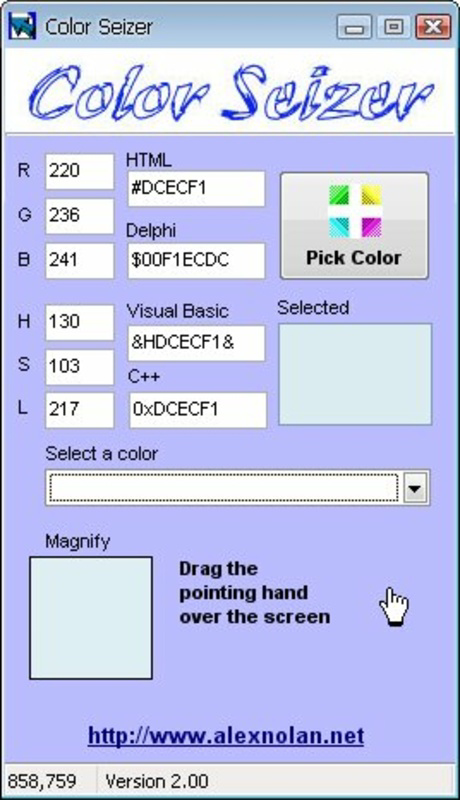
- Multiple Format Support: Outputs selected color codes in HTML, Delphi, Visual Basic, and C++ formats, streamlining integration into various development projects.
- RGB and HSL Output: Provides additional color representations in standard RGB and HSL formats, enhancing flexibility for both design and programming tasks.
- User-Friendly Interface: Designed with simplicity in mind, allowing users to capture and view color codes with minimal steps and intuitive navigation.
- Developer-Centric Workflow: Tailored to reduce time spent on color matching, improving efficiency for developers who frequently reference or implement color values.
For example, a programmer working on a desktop application can use Color Seizer to pick a color from a UI element and instantly retrieve its C++ equivalent, reducing the risk of manual errors. Similarly, a designer can capture a shade from a prototype and export it in HTML format for web implementation. The app’s real-world utility lies in bridging the gap between visual inspiration and technical execution.
Interface, UX & Performance
Color Seizer features a clean and minimal interface focused on core functionality: color selection and code output. The layout prioritizes accessibility, with the main capture tool prominently displayed and color results clearly organized in readable format. Navigation is straightforward, relying on simple gestures or taps to initiate color picking and view results.
Visual style is functional rather than decorative, emphasizing clarity and usability. Color codes are presented in a structured format, making them easy to copy and use across different applications. The app maintains responsiveness across various screen sizes and device types, though the developer did not list formal performance metrics.
Although the developer did not list formal performance metrics, the app appears stable in operation, with no reported issues related to crashes or lag during color capture. It functions reliably in background and foreground modes, ensuring that users can quickly access color codes without interruption. The app’s lightweight nature suggests efficient resource usage, suitable for devices with moderate processing power.
Platform Compatibility & Technical Requirements
Color Seizer is available for Android and iOS platforms. The current software version is not specified, and the file size is not disclosed. The developer did not provide minimum OS requirements or specific device compatibility details.
Compatibility information was not fully disclosed. Users should ensure their device meets general system requirements for modern mobile applications. The app may support a wide range of devices, but exact specifications were not listed. For optimal performance, users are advised to run the latest available OS version on their device.
Pros and Cons
Pros
- Efficient color capture from any screen location
- Supports multiple coding formats including HTML, Delphi, Visual Basic, and C++
- Provides RGB and HSL color values for enhanced flexibility
- Simple and intuitive interface suitable for all user levels
- Designed to improve workflow efficiency for developers and designers
Cons
- Developer did not provide detailed technical specifications
- File size and version information were not disclosed
- Compatibility requirements were not clearly listed
- No information on update frequency or future development plans
- Limited visual feedback during color capture process
FAQ
Is Color Seizer safe to download and install?
Yes, the app is considered secure for use on Android and iOS devices. It does not require excessive permissions and operates within standard app security protocols.
Can I use Color Seizer on both Android and iOS?
Yes, the app is available on both major mobile platforms. Users can install it on compatible devices running Android or iOS.
Does Color Seizer require internet access?
Based on available information, the app functions offline. No internet connection is required to capture colors or view code formats.
How often is Color Seizer updated?
The developer did not disclose update frequency. Users should check the app store for the latest version and release notes.
Can I copy color codes directly from the app?
Yes, the app displays color codes in a format that allows easy copying and pasting into code editors, design tools, or documentation.
Final Thoughts
Color Seizer stands out as a practical and efficient tool for developers and designers who need precise color identification on mobile devices. Its ability to capture colors from any screen and deliver them in multiple programming formats makes it a valuable asset in digital workflows. Despite limited technical details, the app delivers consistent performance and a focused user experience.
It is particularly beneficial for programmers working across multiple languages and platforms, as well as designers seeking accurate color replication. The app’s longevity since 2012 speaks to its reliability and ongoing relevance in the digital toolkit.
For anyone needing a fast, accurate, and secure way to extract color codes on the go, Color Seizer offers a straightforward solution. Download Color Seizer now.
Guides & Tutorials for Color Seizer
How to install Color Seizer
- Click the Preview / Download button above.
- Once redirected, accept the terms and click Install.
- Wait for the Color Seizer download to finish on your device.
How to use Color Seizer
This software is primarily used for its core features described above. Open the app after installation to explore its capabilities.
User Reviews for Color Seizer 0
No reviews found


